What to Put on a Thank You Page (And Why It Matters)

Learn more
I'm Angela
A bit of a unicorn: 18+ years of left brain analytics and right brain creativity, now channeled into websites and branding for creative entrepreneurs. My passion is helping women-owned businesses grow, without burning out and without having to choose between family and business.
INSTAGRAM
FACEBOOK
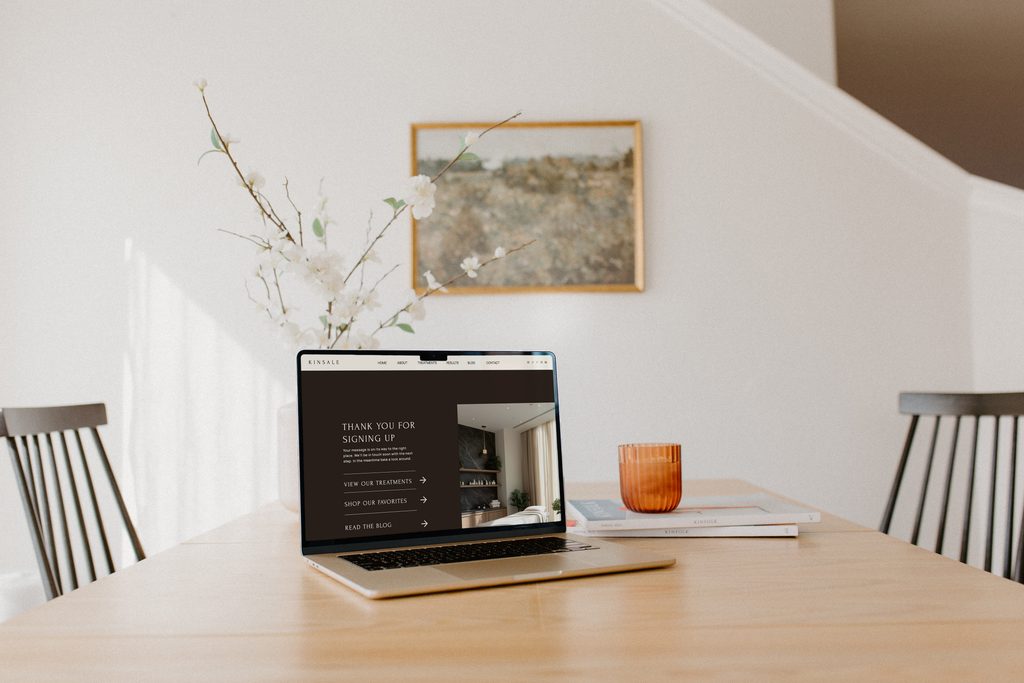
Someone has been on your website for eleven minutes. She read your About page twice. She looked at your work, checked your pricing, decided you were the one, and filled out your contact form with actual butterflies in her stomach.
She hits submit.
And she lands on a mostly blank white page with six words of gray text on it. Thank you. Your message was sent.
All that excitement she built up while she was falling for your brand just went flat. If you have never thought about what to put on a thank-you page, you are in very good company, because almost nobody does. It is the most skipped page on the internet. After 25 years in marketing and working with hundreds of service-based women, I can tell you it is also one of the easiest wins available to you today.
Here is exactly what belongs on that page and how to build it in under 30 minutes. And if your form is not converting in the first place, that is usually one of the website mistakes quietly costing you clients.
Why the Page After “Submit” Matters More Than You Think
Think about what it feels like to hand someone a gift, watch them take it without a word, and walk out of the room. Not rude, exactly. Just flat. That is what a default confirmation message does to a brand new lead.
She just did the scariest thing a website visitor can do. She raised her hand. She gave you her name, her email, and some version of “here is what I need help with,” which for most women is a genuinely vulnerable thing to send to a stranger.
Your thank-you page is her first experience of what it feels like to be your client. Not your onboarding, not your welcome guide, not your first call. This page. And right now, if you are using the default, that first experience is a blank screen.
The way you handle the ten seconds after someone inquires tells her everything about how you will handle the ten weeks after she hires you.
The best part is that this is a set-it-and-forget-it fix. You build the page once, and it works on every single inquiry from now on, at 2 pm on a Tuesday and at 11 pm on a Sunday, without you doing a thing.
1. A Clear Confirmation That the Form Actually Went Through
Start with the most basic job this page has to do. Tell her it worked.
I have filled out contact forms that reloaded the same empty form after I hit submit, and I stood there genuinely not knowing whether my message went anywhere or disappeared into the void. So I filled it out again. Then I felt weird about it and closed the tab.
That is a lead you lost for no reason at all. Say it plainly and say it big enough to actually read. “Got it. Your message is on its way to my inbox.” No mystery, no squinting.
Confusion is the fastest way to lose someone who was ready to say yes.
2. An Actual Thank You in Your Own Voice
The page is called a thank-you page, so use it to say thank you as a human being would.
This is where most default messages fail. “Your submission has been received” is something a parking meter says. You are a person, and she reached out to you because she liked something about you specifically.
Write two or three sentences that sound like you talking. Warm, excited, a little bit personal. Something like: “I am so glad you reached out. I read every single one of these myself, usually with coffee in hand, and I am already looking forward to hearing more about what you are building.”
If your brand is playful, be playful. If it is calm and quiet, be calm and quiet. The only wrong answer is sounding like software.
3. A Timeline for When You’ll Respond
This is the piece almost everyone forgets, and it is the one that makes you look the most professional.
She does not know if you answer in an hour or in two weeks. Without that information, she is going to sit there wondering, and some percentage of people will go inquire with two more businesses just to hedge. Telling her when you will reply takes that anxiety off the table completely.
Here is the trick: take your real response time and add a buffer. If you usually answer within 24 hours, say two business days. Under promise, over deliver, and let yourself have a life.
Try this: “I will get back to you within two business days, Monday through Friday. If you have not heard from me by then, check your spam folder and then send me a nudge.”
Setting a clear expectation is not a small courtesy. It is the difference between someone waiting patiently and someone quietly moving on.
4. One Thing to Do Next
She is still on your website. She is still interested. She is still warm. Do not strand her on a dead-end page with nothing to click.
Give her exactly one next step. Not five. One. Too many options and she will choose none of them, which is how every overstuffed page on the internet fails.
Pick the one that fits your business best:
- A link to your Instagram so she can keep getting to know you while she waits
- One popular blog post that answers the question she is probably about to ask
- A free download, like a checklist or a guide, that gets her onto your email list
- A short client story or portfolio piece that helps her picture working with you
If you are stuck, default to the freebie. Even if she does not hire you this round, you keep the relationship and she stays in your world. Set the delivery up to run on its own with an email tool like Flodesk so she gets it the second she lands on the page.
5. Your Branding, Your Face, and Your Vibe
Your homepage is beautiful. Your services page is beautiful. Your contact form matches perfectly. Then she gets dumped onto a bare white page with system-font text, and the spell breaks.
Use your brand colors. Use your brand fonts. Use the same spacing and style as the rest of your site so the page feels like it belongs.
And put a photo of yourself on it if you have one. A real one, ideally one where you look happy, because she just decided she might want to work with you, and this is a perfect moment to remind her there is a person on the other side of that form.
A thank you page that matches your website is not a design detail. It is proof that you finish what you start.
How to Build Your Thank You Page in Under 30 Minutes
You do not need a developer for this. The setup is the same three steps no matter what platform you are on.
Step 1: Create the page. In Showit, Squarespace, WordPress, or whatever you use, add a new blank page. Name it “thank you” so the URL becomes yourwebsite.com/thank-you. Write it, style it, publish it, and copy that URL.
Step 2: Point your form to it. Go into wherever your contact form lives. In your form settings, look for a field called Redirect URL, Confirmation Page, or After Submission. Paste your thank you page URL there and save. If you use a CRM like Dubsado or HoneyBook, this setting lives in your lead capture form settings, not on your website.
Step 3: Test it yourself. Go to your own contact page, fill out your own form, and hit submit. Watch what happens. Make sure the redirect works, the page looks right on your phone, and the message actually landed in your inbox.
One quick note: if you want to track how many people inquire, having a separate thank you page URL is what makes that possible in Google Analytics. A confirmation message that appears in place cannot be tracked. That page is what tells you your website is working.
Common Questions About Thank You Pages
What should a thank you page say?
Four things: confirmation that the form went through, a warm thank you in your own words, when you will respond, and one next step for her to take. Three or four short sentences total is plenty. Simple and clear beats long and clever every time.
Do I need a separate page, or is a confirmation message enough?
A separate page is better. It gives you room to actually say something, it keeps your branding intact, and it is the only version you can track as a conversion in Google Analytics.
What if my thank you page is really plain?
Plain and finished beats fancy and never published. Solid background color, one photo on one side, your text on the other. That is a complete thank you page and it will do the job. [INTERNAL LINK: the pages every service business website actually needs — post on website structure for beginners]
The Bottom Line
You landed here because someone fills out your form and then falls into a white void, and you had a feeling that was costing you something. It was.
Now you know exactly what to put on a thank you page: confirmation, gratitude, a timeline, one next step, and your actual branding. Five things, one page, half an hour of your afternoon.
This is the kind of detail that separates the businesses that feel good to hire from the ones that feel like a gamble. She will not consciously notice that your thank-you page was thoughtful. She will just feel more sure about you, and she will not be able to tell you exactly why.
Progress over perfection. Go build the plain version today and make it pretty later.
If you would rather not touch your website settings at all, I would love to take it off your plate. My custom website design work covers the whole experience, from the homepage that makes her stop scrolling to the thank-you page that makes her glad she reached out.
Book a discovery call and let’s talk about what your website could be doing for you.
SHARE THIS POst
Leave a Reply
The beginner's checklist for building a list from zero.
no 02. | DOWNLOAD
Your Starter Guide To Building An Email List.
Download now
An interactive roadmap for showing up when people ask AI for a recommendation.
no 03. | Interactive roadmap
Get AI to Recommend Your Business
let's get started
Exactly what to ask clients so you get testimonials worth putting on your website.
no 01. | download
The Testimonial Blueprint
Download Now